2016-07-12

Keyboard with built-in Soundcard

I was looking for keyboard with built-in soundcard (not just passthrough), but the moderator deletes both my question and answers. Oh well, I post the updated results here now:

Cooler Master Storm Mech
+ Mechanical
+ White backlight
+ 1ms pooling rate
+ 1.5m cable
+ 553 x 267 x 43 mm
+ 1686 gr
+ 5 macro keys
+ USB 3
official review youtube


Thermaltake eSports Challenger Ultimate
+ Membrane
+ Full color backlight
+ 2ms pooling rate
+ 2m braided cable
+ 505 x 195 x 27 mm
+ Fan
+ 14x5 macro keys
+ 6 multimedia keys
official youtube


Logitech G510s
+ Membrane+ Full color backlight
+ 2ms pooling rate
+ 6 keys anti-ghosting
+ 2m cable
+ 557 x 215 x 31 mm
+ 1205 gr
+ Built-in LCD
+ UV Coated keys
+ 18 macro keys
+ 4 media keys
official youtube


Thermaltake eSports Poseidon Z Forged
+ Mechanical
+ Blue backlight
+ 1ms pooling rate
+ 104 keys anti-ghosting+ 1.8 m cable
+ 503 x 156 x 43 mm
+ 1474 gr
+ 10 macro keys
official review youtube


Thermaltake eSports Meka G-Unit
+ Mechanical
+ White backlight
+ 46 keys anti-ghosting
+ 1ms pooling rate
+ 554 x 271 x 70 mm
+ 1.8m braided cable+ 12 macro keys
+ 7 media keys
official youtube


What's the best? dunno guys XD never tried any of them.

2016-07-03

If Operating Systems ran The Airlines

Copied from https://telegram.me/programmerjokes

UNIX Airways 

Everyone brings one piece of the plane along when they come to the airport. They all go out on the runway and put the plane together piece by piece, arguing non-stop about what kind of plane they are supposed to be building.

Air DOS 

Everybody pushes the airplane until it glides, then they jump on and let the plane coast until it hits the ground again. Then they push again, jump on again, and so on...

Mac Airlines 

All the stewards, captains, baggage handlers, and ticket agents look and act exactly the same. Every time you ask questions about details, you are gently but firmly told that you don't need to know, don't want to know, and everything will be done for you without your ever having to know, so just shut up.

Windows Air 

The terminal is pretty and colourful, with friendly stewards, easy baggage check and boarding, and a smooth take-off. After about 10 minutes in the air, the plane explodes with no warning whatsoever.

Windows NT Air 

Just like Windows Air, but costs more, uses much bigger planes, and takes out all the other aircraft within a 40-mile radius when it explodes.

Windows XP Air 

You turn up at the airport,which is under contract to only allow XP Air planes. All the aircraft are identical, brightly coloured and three times as big as they need to be. The signs are huge and all point the same way. Whichever way you go, someone pops up dressed in a cloak and pointed hat insisting you follow him. Your luggage and clothes are taken off you and replaced with an XP Air suit and suitcase identical to everyone around you as this is included in the exorbitant ticket cost. The aircraft will not take off until you have signed a contract. The inflight entertainment promised turns out to be the same Mickey Mouse cartoon repeated over and over again. You have to phone your travel agent before you can have a meal or drink. You are searched regularly throughout the flight. If you go to the toilet twice or more you get charged for a new ticket. No matter what destination you booked you will always end up crash landing at Whistler in Canada.

Linux Air 

Disgruntled employees of all the other OS airlines decide to start their own airline. They build the planes, ticket counters, and pave the runways themselves. They charge a small fee to cover the cost of printing the ticket, but you can also download and print the ticket yourself.

When you board the plane, you are given a seat, four bolts, a wrench and a copy of the seat-HOWTO.html. Once settled, the fully adjustable seat is very comfortable, the plane leaves and arrives on time without a single problem, the in-flight meal is wonderful. You try to tell customers of the other airlines about the great trip, but all they can say is, "You had to do what with the seat?"

Example:
Sorry, this is the best analogy on the subject of linux, has been around for a long time, and is anonymous.

BTW, linux is the kernel, GNU/GPL software make up the rest of the OS and apps.  GNU/Linux is the way lawyers will say it in court.

2016-06-19

Flowchart to choose your programming language

Just now, I found a cool site to generate flowchart from source code (just like dot program):

(click for larger picture)

Anyway this just a joke, just like before (if programming language were religion/woman), may odds be in your favor..

Btw here's the code if you want to modify.. please use http://pastie.org if you want to do a long comment containing source code..

Choosing Programming language flowchart;
if(I really really care 
about runtime performance) {
  if(I am masochist..) {
    if(I like Mozilla..) {
      Use Rust;rust-lang.org
    } else {
      Use C++;cplusplus.com
    }
  } else if(I don't want 
  to learn something new..) {
    Use C;cprogramming.com
  } else if(I like long lines..) {
    Use Java;java.com
  } else if(I like FP?) {
    if(But I'm not masochist..) {
      Use Scala;scala-lang.org;
    } else if(I like parentheses..) {
      Use Clojure;clojure.org
    } else if(I like Microsoft) {
      Use FSharp;fsharp.org;
    } else {
      Use Haskell;haskell.org;
    }
  } else { 
    if(I like Microsoft..) {
      if(I hate C++) {
        if(My computer is ancient..) {
          Use VB6;
        } else {
          Use VB.NET;
        } 
        vbforums.com;
      } else {
        Use CSharp;csharp-station.com;
      }
    } else if(I like Facebook..) {
      Use Hack;hacklang.org;
    } else if(I like Apple..) {
      if(I'm a bit masochist..) {
        Use Objective-C;developer.apple.com;
      } else {
        Use Swift;swift-lang.org;
      }
    } else if(I like Google..) {
      if(But I also like java 
      and javascript..) {
        Use Dart;dartlang.org;
      } else { 
        Use Go;golang.org;
      }
    } else {
      // you can also use Lazarus
      // lazarus.freepascal.org
      Use Delphi;embarcadero.com;
    }
  } 
} else {
  if(I don't want to install a thing..) {
    if(I use linux, mac, or win 10) {
      Use Bash;bash-hackers.org;
    } else {
      Use Javascript;javascript.com;
    }
  } else if(I love spaghetti..) {
    if(I don't care about my future..) {
      // Most likely you will be killed by maintainer that reads your code..
      Use Perl;perl.org;
    } else {
      Use PHP;php.net;
    }
  } else if(I want to make game mods..) {
    Use Lua;lua.org;
  } else if(I like indentations..) {
    Use Python;python.org;
  } else {
    Use Ruby;ruby-lang.org;
  }
}

Aww snaps, I forgot to add Elixir, Julia, and Crystal  -_- oh well.. maybe sometime in the future.

2016-06-11

EasyEngine: WordPress made easy

So, newbies out there, for those that have a root server access or VPS, and you want to create a blog. There is a tool called EasyEngine that could help you (automate) setup Nginx (not Apache), PHP (or PHP7/HHVM), MariaDB/MySQL database, Postfix mail transfer agent, WordPress, WP Super Cache (or W3 Total Cache, Nginx Cache, WP Redis) on Ubuntu or Debian operating system.

There's a lot more it can offer:

How to install EasyEngine?

wget -qO ee rt.cx/ee && sudo bash ee

What's we must use this? it saves time (automated install, automatic update), best practice (Nginx instead of Apache, HHVM/PHP7 instead of PHP5, caching), configuration backup (using Git)


For more information you can visit their website https://easyengine.io/

But wait kiz, you hate PHP right? why you endorse this?
at least this IS far better than poor performance/neglected/insecure/lousy crap configuration/choice that I always see in the past.

2016-06-05

Go is Programming Language for The Future

Well, I like Go so much, Here's some reason why Go is the language for the future:

1. low learning curve. syntax similar to C, but it's simplified, high readability, standardized code-formatting, almost no syntax changes from older version to newer version, has compact language specification for whole language (only 79 A4 pages) compared to:
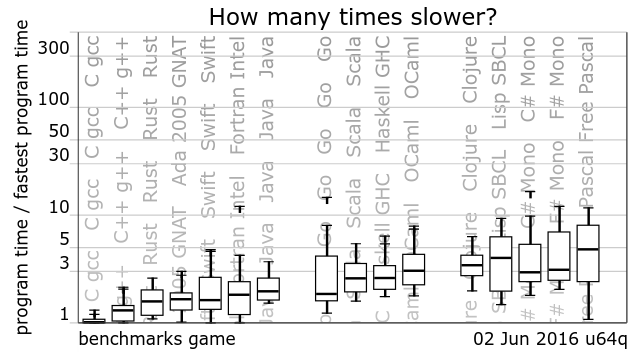
2. it performs near equal to Java
3. fast compile, especially for big project

4. concurrency at language level, it's no doubt that concurrency is the trend (processor manufacturer now tend to adding more cores)

5. garbage collected, safe-pointer, contrast to manual memory management that can lead to buggy code (eg. memory leaks, buffer overflow attacks)

6. built-in utf8 string and maps (associative array), as other newer programming language also done (the Go programming language creator also the one that wrote utf8)

7. big company support (Google), other companies that have been using Go: Dropbox, Twitter, SoundCloud, etc, this leads to future job vacancy.


8. small memory footprint (unlike Java, that everything has 8-12 bytes overhead)

9. built-in package management, it's easy to distribute libraries, leads to many contribution.

10. simple cross compilation

11. autocomplete daemon, this leads to many editor/IDE support

12. built-in testing support (for TDD/BDD)

There's many other things that I personally like from Go:
  • variable initial value always zeroed
  • limited set of operator (no frustration when other people use too many operator with confusing precedence)
  • no generics XD yes, I found C++'s template error message really painful, but templates are quite useful when writing generic data structures
  • letter case visibility
  • no function overloading
  • statically linked
  • no circular dependency
  • no warnings, just errors
I bet Go will become really popular in 2020 (at least until full-featured Swift comes to Linux and Windows). Hopefully there would be Go that compiles to WebAssembly :3


Real Reason to use newer Go 1.5+: Cross Compile

As you already know, that compiling in Golang becomes slower since 1.5+, then why we must use the newer? there's no incompatible syntax changes right? See the graph below for the compile duration ratio:


There's some you must consider when using older Go version (<1.4.3):
  1. Broken libraries, some libraries (such as fasthttp) doesn't support older version of Go (<1.5), because there are changes on standard libraries, for example there's no bytes.LastIndexByte, bufio.Reader.Discard,  time.Time.AppendFormat, etc on older version of go standard library)
  2. Slower GC (see Go 1.6 latest low latency garbage collector, it's even less than 21ms)
  3. Bigger binary produced (but see goupx)
  4. Slower runtime performance (but it's already fast compared to another language)
  5. No Vendoring (see no more dependency hell)
  6. And lastly, no Cross Compiling!
Did you know that since Go 1.5 you can build other platform's binary?

$ go build
-rwxr-xr-x   1 asd  staff  11261296 Jun  5 19:41 PUPS
PUPS: Mach-O 64-bit executable x86_64

$ env GOOS=linux GOARCH=amd64 go build
-rwxr-xr-x   1 asd  staff  9232191 Jun  5 19:42 PUPS
PUPS: ELF 64-bit LSB executable, x86-64, version 1 (SYSV), statically linked, not stripped

$ env GOOS=windows GOARCH=386 go build
-rwxr-xr-x   1 asd  staff  8048640 Jun  5 19:42 PUPS.exe
PUPS.exe: PE32 executable for MS Windows (console) Intel 80386 32-bit

This feature is really useful especially when your server is Linux, but you develop in Mac :3
Or when you want to create a cross-platform games/apps.

Solution for golang Slow Compile

I think this need more exposure, http://dev.pawelsz.eu/2015/09/slow-go-compilation.html show that slow compilation source, by using -x flag. This also related to my previous answer on stackoverflow http://stackoverflow.com/a/26752149/1620210 a real slowdown that happened after upgrading or downgrading to newer version of golang. Fortunately, there's a quickfix for that:

First of all if you are using go 1.7, you'll need to change the ownership of your GOROOT's pkg directory:

[ `ls -ld $GOROOT/pkg | awk '{print $3}'` != `whoami` ] && sudo chown -Rv `whoami` $GOROOT/pkg

Then if you are upgrading or downgrading, you'll need to remove the GOPATH's pkg directory, there's the bash snippet to check if gitlab.com/kokizzu/gokil library was precompiled with different golang version than installed:

PKG_OS_ARCH=`go version | cut -d ' ' -f 4 | tr '/' '_'`
[ `strings $GOPATH/pkg/$PKG_OS_ARCH/gitlab.com/kokizzu/gokil/A.a | grep 'go object' | head -n 1 | cut -f 5 -d ' '` != `go version | cut -f 3 -d ' '` ] && rm -rf $GOPATH/pkg

This last part stolen from the blog above, the real script that makes the next compile runs faster:

go list -f '{{.Deps}}' ./... | tr "[" " " | tr "]" " " | \
  xargs go list -f '{{if not .Standard}}{{.ImportPath}}{{end}}' | \
  xargs go install -a

Alternatively, you can use

go build -i

The last 2 commands above looks for all dependencies and recompile/preinstall them, it's better than I expected, normally it took about 15 seconds to recompile on go1.6.2.

# go 1.4.3
[gin] Build Successful in 1802.47 ms
[gin] Build Successful in 2854.65 ms
[gin] Build Successful in 2325.35 ms

# go 1.6.2
[gin] Build Successful in 5673.43 ms
[gin] Build Successful in 8081.75 ms
[gin] Build Successful in 6867.12 ms

# go 1.7b1
[gin] Build Successful in 2579.98 ms
[gin] Build Successful in 3649.08 ms
[gin] Build Successful in 4182.04 ms
[gin] Build Successful in 3881.66 ms
[gin] Build Successful in 3722.20 ms
[gin] Build Successful in 2785.84 ms
[gin] Build Successful in 2981.62 ms
[gin] Build Successful in 3793.66 ms
[gin] Build Successful in 4458.86 ms
[gin] Build Successful in 4376.60 ms

Anyway I still stick with go1.4.3 since it has the fastest compile, it makes our edit-compile-test cycle faster.

2016-05-26

Iris Web Framework

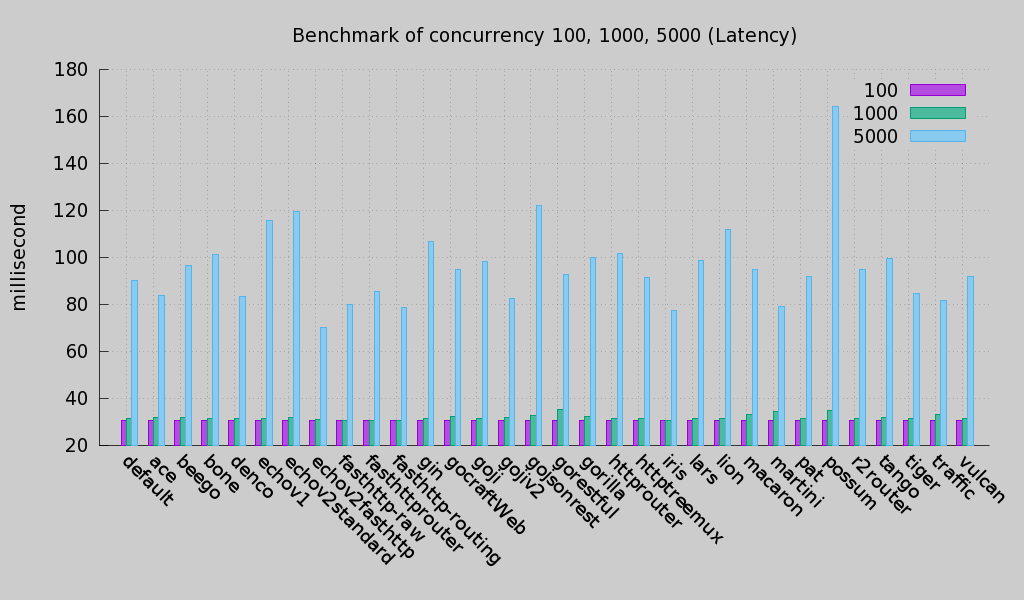
Shock! That was what I feel when see Iris benchmark '__'), after looking at the code, ah no wonder, it uses fastest router (fasthttp), that uses almost zero allocation per request.

These graphs stolen from SmallNest's go framework benchmark.


As usual, static request means nothing, dynamic request that uses database are the real bottleneck :3
Btw Iris has book for those who are interested. For those who doesn't need full framework, you can use the fasthttprouter.

EDIT: before you use Iris because of performance, see links on the comments below: this by julienschmidt (one that create httprouter) and this by dlsniper (one that initialize go-lang-idea-plugin project).

 What's the alternative? you can use valyala's FastHttp (only router), Arteugo, or Fiber (full framework, really similar to ExpressJS)

2016-04-19

Remap Keyboard Shortcut on Mac OSX

Recently I bought a secondhand Macbook Pro, since it's sold in a really-really good price. This is my first time experiencing Mac OSX, and my experience has been quite good, almost everything is there and easy as easy as yaourt+better automation (called brew), better UI than Windows, and I never feel any lag (maybe because it's SSD). All great, except, the shortcut keys, it's quite weird to have Fn key on the left of Ctrl key (just like most Lenovo laptops), also command key that replaces almost every normal shortcut on Windows and Linux.

First few days, using the shortcuts, I quite dissatisfied until I found about Karabiner! With that app, I could remap every keyboard shortcuts that I like so it becomes similar to Linux and Windows settings.


First thing I've done is switch Ctrl and Fn and vice versa. For all other shortcut, I edit the private.xml to match my preferred shortcut to Mac's shortcut. These are the content of the file:

<?xml version="1.0"?>
<root>
    <appdef>
        <appname>ITERM2</appname>
        <equal>com.googlecode.iterm2</equal>
    </appdef>
    <appdef>
        <appname>INTELLIJ</appname>
        <equal>com.jetbrains.intellij</equal>
    </appdef>
    <item>
        <name>Command-Q to Control-C</name>
        <appendix>Cmd-Q to Ctrl-C for iTerm2</appendix>
        <identifier>CQ2CC</identifier>
        <only>ITERM2</only>
        <autogen>
            __KeyToKey__
            KeyCode::Q, ModifierFlag::COMMAND_L,
            KeyCode::C, ModifierFlag::CONTROL_L
        </autogen>
    </item>
    <item>
        <name>Control to Alt</name>
        <appendix>Ctrl to Alt (Left/Right/Backspace)</appendix>
        <identifier>C2A</identifier>
        <not>INTELLIJ</not>
        <autogen>
            __KeyToKey__
            KeyCode::DELETE, ModifierFlag::CONTROL_L,
            KeyCode::DELETE, ModifierFlag::OPTION_L
        </autogen>
        <autogen>
            __KeyToKey__
            KeyCode::CURSOR_LEFT, ModifierFlag::CONTROL_L,
            KeyCode::CURSOR_LEFT, ModifierFlag::OPTION_L
        </autogen>
        <autogen>
            __KeyToKey__
            KeyCode::CURSOR_RIGHT, ModifierFlag::CONTROL_L,
            KeyCode::CURSOR_RIGHT, ModifierFlag::OPTION_L
        </autogen>
        <autogen>
            __KeyToKey__
            KeyCode::CURSOR_LEFT, ModifierFlag::CONTROL_L | ModifierFlag::SHIFT_L,
            KeyCode::CURSOR_LEFT, ModifierFlag::OPTION_L | ModifierFlag::SHIFT_L
        </autogen>
        <autogen>
            __KeyToKey__
            KeyCode::CURSOR_RIGHT, ModifierFlag::CONTROL_L | ModifierFlag::SHIFT_L,
            KeyCode::CURSOR_RIGHT, ModifierFlag::OPTION_L | ModifierFlag::SHIFT_L
        </autogen>
    </item>
    <item>
        <name>Control to Command</name>
        <appendix>Ctrl to Cmd (A/C/F/R/S/T/V/W/X/Z)</appendix>
        <identifier>C2C</identifier>
        <autogen>
            __KeyToKey__
            KeyCode::A, ModifierFlag::CONTROL_L,
            KeyCode::A, ModifierFlag::COMMAND_L
        </autogen>
        <autogen>
            __KeyToKey__
            KeyCode::C, ModifierFlag::CONTROL_L,
            KeyCode::C, ModifierFlag::COMMAND_L
        </autogen>
        <autogen>
            __KeyToKey__
            KeyCode::F, ModifierFlag::CONTROL_L,
            KeyCode::F, ModifierFlag::COMMAND_L
        </autogen>
        <autogen>
            __KeyToKey__
            KeyCode::L, ModifierFlag::CONTROL_L,
            KeyCode::L, ModifierFlag::COMMAND_L
        </autogen>
        <autogen>
            __KeyToKey__
            KeyCode::R, ModifierFlag::CONTROL_L,
            KeyCode::R, ModifierFlag::COMMAND_L
        </autogen>
        <autogen>
            __KeyToKey__
            KeyCode::S, ModifierFlag::CONTROL_L,
            KeyCode::S, ModifierFlag::COMMAND_L
        </autogen>
        <autogen>
            __KeyToKey__
            KeyCode::T, ModifierFlag::CONTROL_L,
            KeyCode::T, ModifierFlag::COMMAND_L
        </autogen>
        <autogen>
            __KeyToKey__
            KeyCode::V, ModifierFlag::CONTROL_L,
            KeyCode::V, ModifierFlag::COMMAND_L
        </autogen>
        <autogen>
            __KeyToKey__
            KeyCode::W, ModifierFlag::CONTROL_L,
            KeyCode::W, ModifierFlag::COMMAND_L
        </autogen>
        <autogen>
            __KeyToKey__
            KeyCode::X, ModifierFlag::CONTROL_L,
            KeyCode::X, ModifierFlag::COMMAND_L
        </autogen>
        <autogen>
            __KeyToKey__
            KeyCode::Z, ModifierFlag::CONTROL_L,
            KeyCode::Z, ModifierFlag::COMMAND_L
        </autogen>
    </item>
</root>

Keyboard map above will trigger most of mac shortcut, but using Ctrl key instead of Cmd key:

  • Cmd-Q will trigger Ctrl-C (exit current program) on iTerm2
  • Ctrl-Left/Right: skip word
  • Ctrl-Shift-Left/Right: select word
  • Ctrl-Backspace: delete 1 word
  • Ctrl-A: select all
  • Ctrl-C: copy
  • Ctrl-F: find
  • Ctrl-L: location
  • Ctrl-R: refresh
  • Ctrl-S: save
  • Ctrl-T: new tab
  • Ctrl-V: paste
  • Ctrl-W: close tab
  • Ctrl-X: cut
  • Ctrl-Z: undo
I didn't put some other shortcuts that I didn't use (mostly because it's can be configured on the IDE/TextEditor) or just because it's already works well, for example Ctrl-Tab for switching tab, Ctrl-D for logout, and so on. If you want to learn more, you can read the reference here.

2016-03-09

Lightweight Go IDE (with Debugging support)

Today I found that Visual Studio Code by Microsoft is quite charming, it based on Electron, library that being used to make Atom Editor (and Nuclide by Facebook). It loads fast, really fast. In ArchLinux or Manjaro, you can install it using this command:

yaourt -S visual-studio-code

After installing, type Ctrl+Shift+P, Install Extension, choose Go (Rich Go bla bla..). And yes, it requires internet connection.

Then install the tools required:

go get -u -v github.com/nsf/gocode
go get -u -v github.com/rogpeppe/godef
go get -u -v github.com/golang/lint/golint
go get -u -v github.com/lukehoban/go-find-references
go get -u -v github.com/lukehoban/go-outline
go get -u -v sourcegraph.com/sqs/goreturns
go get -u -v golang.org/x/tools/cmd/gorename
go get -u -v github.com/tpng/gopkgs
go get -u -v github.com/newhook/go-symbols

For debugging, install delve (it requires Go 1.5 or newer).

The import bulb will show if a package not yet imported:

The autocomplete just works as expected:

Argument tooltip (parameter info) shown correctly:

Jump to definition works (Ctrl+Click):

I believe this is better alternative (for now) than Atom, Brackets, LightTable, and LimeText (incomplete SublimeText implementation).